

Building the Compiler
The Hylo compiler is written in Swift, links against LLVM 23, and can be built using the Swift Package Manager.
Environment setup can be challenging, so here is some emotional support:

If something doesn’t work, feel free to ask on Slack or report an issue!
Environment Setup
Section titled “Environment Setup”You can either set up the environment manually, or use a devcontainer (recommended).
Option 1: Devcontainer
Section titled “Option 1: Devcontainer”A development container allows us to use a pre-built Docker image, hylo-dev-toolchain as our development environment. To use it, we need a container Runtime such as Docker. Using VSCode has the best devcontainer integration, but others may also work.
Set up Docker
Section titled “Set up Docker”Install Docker Desktop, or Docker Engine along with its post-installation steps.
Install Docker Desktop.
Docker runs inside WSL 2 on Windows.
-
Install WSL 2, following Microsoft’s guide. In a terminal running as administrator:
wsl --installThen reboot your machine, and if prompted, create a WSL Linux user. Note: you can choose any Linux distro that has a recent Glibc, such as Ubuntu or Debian. We don’t have a Hylo compiler release built for Alpine yet.
-
Install Docker Desktop.
-
Enable WSL Integration in Docker: Open Docker Desktop, and go to Settings (gear icon) > Resources > WSL Integration, and enable WSL integration for the distro you have installed.
Cloning the repository
Section titled “Cloning the repository”Clone the repository inside WSL. Avoid cloning on a Windows drive to avoid a huge slow-down, newline-related problems and other container building failures.
git clone https://github.com/hylo-lang/hylo-newcd hylo-newgit submodule update --initOpen the container in VSCode
Section titled “Open the container in VSCode”-
Install the Dev Containers extension.
-
Open the
hylo-newfolder, then runDev Containers: Reopen in Containerfrom the command palette. -
Build the compiler from the integrated terminal, which is now running inside the container:
swift build
-
Install the Dev Containers extension.
-
Open the
hylo-newfolder, then runDev Containers: Reopen in Containerfrom the command palette. -
Build the compiler from the integrated terminal, which is now running inside the container:
swift build
-
Install the Dev Containers and the WSL extensions.
-
Run the
Connect to WSLaction in VSCode. -
Open the
hylo-newfolder in the remote file browser, not on the Windows file system. -
Run the
Dev Containers: Reopen in Containeraction in VSCode. -
Build the compiler from the integrated terminal, which is now running inside the container:
swift build
Congrats, you are now ready to go! Skip to Build and test.
Bonus: Opening the container from the command line
Section titled “Bonus: Opening the container from the command line”If you use a terminal based code editor, you can edit the sources locally, and perform building and testing using the devcontainer CLI:
npm install -g @devcontainers/cli
devcontainer up --workspace-folder .devcontainer exec --workspace-folder . swift builddevcontainer exec --workspace-folder . swift testdevcontainer down --workspace-folder . # warning: removes the container
Bonus: Building against the Debug LLVM
Section titled “Bonus: Building against the Debug LLVM”By default, the container uses MinSizeRel LLVM. If you need to debug some LLVM internals,
you can make the container use the Debug image version by setting the environment variable
HYLO_LLVM_BUILD_TYPE to Debug:
export HYLO_LLVM_BUILD_TYPE=DebugOption 2: Manual Installation
Section titled “Option 2: Manual Installation”-
Install Swift 6.3.2 or newer, using swiftly, Swift’s toolchain installer.
-
Install pkg-config, which Swift Package Manager uses to find LLVM, and zstd for decompression.
sudo apt install pkg-config zstd -
Download Hylo’s latest LLVM build from the llvm-build releases page and extract it somewhere permanent (
tar --zstd -xvf llvm.tar.zst). Unless you are debugging the LLVM code generation part of Hylo, you probably want theMinSizeRelvariant, as theDebugvariant slows down testing considerably.We build LLVM for x64 and arm64, requiring glibc 2.39+ (Ubuntu 24.04+). If your platform is not among these, you will need to acquire an LLVM 23 distribution that works for you, and generate
llvm.pcusing our scripts. -
Tell pkg-config where to locate LLVM. The archive contains a
pkgconfigsubdirectory holdingllvm.pc, which must be exposed onPKG_CONFIG_PATH:export PKG_CONFIG_PATH="<LLVM>/pkgconfig:$PKG_CONFIG_PATH"Confirm it resolves:
pkg-config --modversion llvm
-
Install Swift 6.3.2 or newer, from swift.org, or by installing Xcode.
-
Install pkg-config, which Swift Package Manager uses to find LLVM.
brew install pkgconf -
Download Hylo’s latest LLVM build from the llvm-build releases page and extract it somewhere permanent.
We build LLVM for Apple silicon and Intel, requiring macOS 26+. If your platform is not among these, you will need to acquire an LLVM 23 distribution that works for you, and generate
llvm.pcusing our scripts. -
Tell pkg-config where to locate LLVM. The archive contains a
pkgconfigsubdirectory holdingllvm.pc, which must be exposed onPKG_CONFIG_PATH:export PKG_CONFIG_PATH="<LLVM>/pkgconfig:$PKG_CONFIG_PATH"Confirm it resolves:
pkg-config --modversion llvm
-
Install Swift 6.3.2 or newer, from swift.org.
-
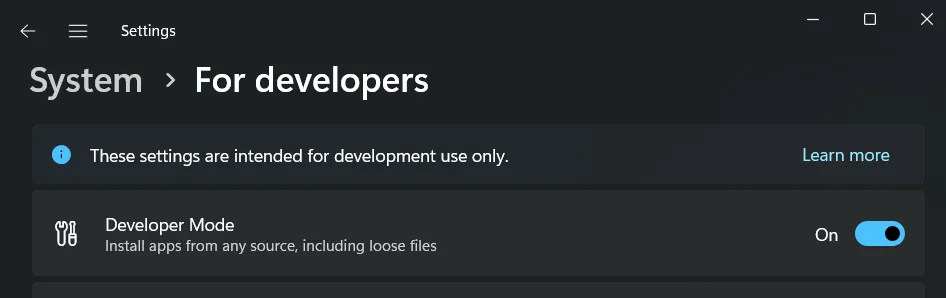
Enable developer mode in Settings > System > For developers > Developer Mode:
-
Install pkg-config, which Swift Package Manager uses to find LLVM.
choco install pkgconfigliteOr download it from SourceForge and add its
bindirectory toPath. -
Download Hylo’s latest LLVM build from the llvm-build releases page and extract it somewhere permanent.
We build LLVM for x64 and arm64, requiring Windows 11. If your platform is not among these, you will need to acquire an LLVM 23 distribution that works for you, and generate
llvm.pcusing our scripts. -
Tell pkg-config where to locate LLVM. The archive contains a
pkgconfigsubdirectory holdingllvm.pc, which must be exposed onPKG_CONFIG_PATH:PowerShell $env:PKG_CONFIG_PATH = "<LLVM>\pkgconfig;$env:PKG_CONFIG_PATH"# Persist across sessions:[Environment]::SetEnvironmentVariable("PKG_CONFIG_PATH", $env:PKG_CONFIG_PATH, "User")Confirm it resolves:
pkg-config --modversion llvm
Build and test
Section titled “Build and test”swift build # build in debug mode, without testsswift test # build and run tests in debug modeswift test -c release # build and run tests in release modeswift test --parallel # build and run tests in parallelCompiler Tests
Section titled “Compiler Tests”A large part of our test suite is generated from hylo programs at
Tests/CompilerTests/{positive,negative}/*.hylo.
See instructions in the Compiler Testing Guide.
Building for cross-compilation
Section titled “Building for cross-compilation”By default, a custom-built hc can only generate code for the machine it is running on. To build a cross-capable
version, supply the SWIFTY_LLVM_CROSS_COMPILATION_ENABLED flag (already set in official releases):
swift build -c release -Xswiftc -DSWIFTY_LLVM_CROSS_COMPILATION_ENABLEDIf everything works, welcome on board!